
Introduction
The daily bonus in 3 Patti Pearl is an engagement reward with a claim routine, not a paycheck. This page shows how to find and claim it calmly, how to think about streaks and reset timers, and what to do when the button is grey or the animation stalls. It is written for Android users who want fewer missed claims without reinstall spam or fake “unlimited bonus” downloads.
Claim on stable internet. Tap once. Confirm the reward landed in balance or mail. Then decide whether you still want to play within your planned time. A bonus can brighten a session; it should not rewrite your spending or push you into chase mode. Exact button art and panel names can vary by version, so use lobby bonus areas and mailbox-style panels as your map.
If the feature is missing for a stretch, it may be off-schedule, already claimed, or temporarily unavailable — not proof that a hacked APK is required. Stick to the standard app and official in-app messaging.
Daily Claim Routine
- Open 3 Patti Pearl on stable Wi‑Fi when you can
- Confirm you are on the correct logged-in account
- Open the lobby bonus area and check mailbox or events panels if present
- Claim once without rapid re-taps
- Watch for a counter update, reward text, or mail confirmation
- Only then start a play block that still respects your timer
Double-tapping during lag can make you unsure whether the claim registered. Waiting and checking status beats hammering the button. If the UI freezes, restart once and verify before claiming again.
Streak and Timing
Streaks reward consistency, yet reset windows can feel different depending on timezone handling and version. Trust the in-app countdown more than memory or a friend’s screenshot from last month. Missing a day is annoying. Breaking an unbound Guest account with repeated reinstalls to “refresh” a bonus is worse.
| Situation | Check this first | Avoid |
|---|---|---|
| Button disabled | Reset countdown and claim history | Force-close spam loops |
| Bonus missing | Correct account login | Creating duplicate accounts |
| Claim lag | Network stability | VPN hopping mid-claim |
| Animation freeze | Restart once + verify balance/mail | Reinstall as first reaction |
Timezone Patience
If you travel or keep the phone on automatic time that jumps, bonus readiness can feel inconsistent. Prefer automatic network time rather than manual experiments designed to trick timers. Timer tricks are a common myth; they create support headaches more often than rewards.
When Claims Fail
Start with network and account identity. Confirm the browser can load other sites. Confirm you are not on a different Guest. Then retry once. Clearing cache may help some UI glitches but is risky if the account is still unbound — bind recovery details before aggressive cleanup. Support messages should include account ID, approximate time of the attempt, and what the screen showed — never your password.
- Do not reinstall solely to force a new daily bonus
- Do not install bonus-generator APKs
- Do not share OTP with someone offering to “claim for you”
- Do not treat a missed streak as a reason to chase losses at tables
Daily bonuses support entertainment engagement. They are not guaranteed earnings or unlimited money.
A Healthy Bonus Routine
Pair the claim with a small ritual: open app, claim, check mail, then either play a short planned block or leave. That sequence prevents bonus collection from becoming an accidental two-hour tilt session. If you only opened the app to claim, it is allowed to close the app afterward. Streaks are optional psychology, not moral duty.
| Routine style | Steps | Benefit |
|---|---|---|
| Claim and go | Login → claim → exit | Protects time |
| Claim and practice | Claim → short timed session | Structured play |
| Claim and review | Claim → read one rules note | Learning streak |
Common Daily Bonus Mistakes
Bonus-specific mistakes include claiming on the wrong account, reinstall loops, believing a VPN changes reset math in your favor, and confusing mailbox items with daily claim buttons. People also overvalue streak aesthetics and undervalue sleep — claiming at exhausted hours often leads straight into poor table decisions.
- Wrong profile claimed, right profile missed
- Rapid taps during outages
- Reinstall as a streak “strategy”
- Fake APKs promising unlimited daily cash
- Letting a claim ritual erase your stop timer
After You Claim
Confirm the reward, then return to your wider plan: rules practice, short hands, or simply stopping. If referrals or VIP panels interest you, explore them as separate topics with sober expectations. A daily bonus is a small loop. Keep it small.
Mailbox Versus Lobby Claim Paths
Some builds deliver daily rewards through a lobby button; others route items through mailbox-style panels first. If you claimed but balance looks unchanged, check both paths before reinstalling. Mail items sometimes require a second tap to collect. UI moves after updates can hide the button under a new icon — scan calmly rather than assuming the feature vanished.
Mailbox clutter from events can bury daily items. Sort mentally by date and read titles literally. Deleting unread mail in frustration is a common way to lose track of legitimate rewards that were waiting for confirmation.
Wrong-Account Claim Traps
Household phones accumulate Guest profiles and half-forgotten logins. Claiming on Guest while your bound account sits unused is a weekly mistake. Confirm the profile name or ID in the corner before you tap claim. If the wrong account received the reward, do not create a third profile — log into the correct one tomorrow and accept the miss as a lesson.
- Profile ID matches the account you care about
- Not mid-switch between Wi‑Fi and mobile data
- No parallel modded clone open in the background
- Claim history panel checked after a laggy animation
Streak Psychology Without Guilt
Streak counters use loss-aversion design: missing a day feels like failure even when life intervened. Missing a day is allowed. Travel, exams, load shedding, and family obligations happen. Return when stable rather than doubling session length to “make up” for a broken streak. Compensation sessions often erase more chips than the missed claim was worth.
| Streak thought | Reality check | Healthier response |
|---|---|---|
| I must claim at midnight | Sleep matters more | Claim when awake and stable |
| Broken streak ruined my month | Counters reset; skill remains | Resume tomorrow calmly |
| Need hack to restore streak | Scam pattern | Standard app only |
| Bonus justifies long chase | Separate decisions | Claim then stop if timer done |
Support Facts for Bonus Issues
When a claim truly fails, support needs account ID, approximate time, network type, and exact on-screen text — not rage paragraphs. Screenshot crop away personal notifications. Never send OTP to “bonus fix agents.” Most bonus tickets resolve faster when you prove you are on the correct account and tried once on Wi‑Fi.
Daily bonuses reward showing up, not playing until exhaustion. Treat them accordingly.
Account Alignment Before Claiming
Bonuses attach to accounts, not to the physical phone alone. If family members share a handset, confirm you are on your Logon before claiming. Claiming on the wrong profile creates ghost stories about “stolen streaks.” Thirty seconds of identity confirmation prevents a week of confusion.
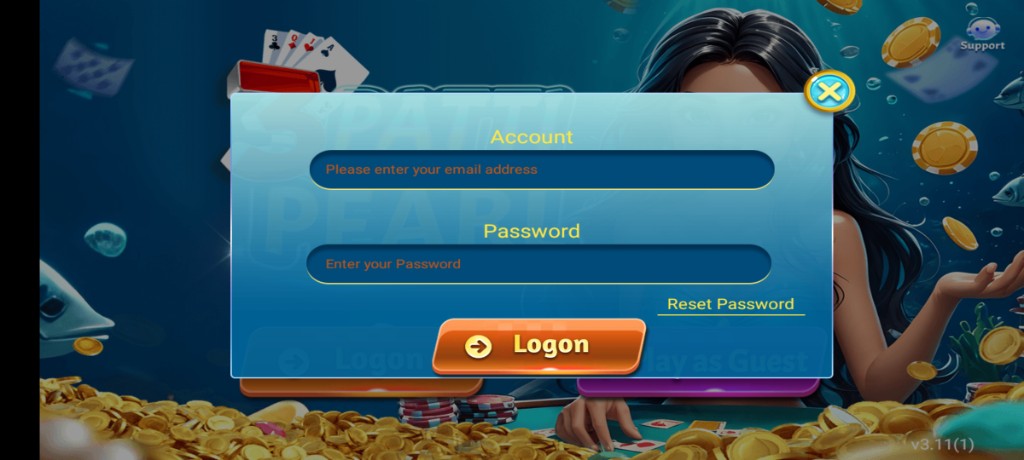
If you recently reinstalled, complete Logon first, then claim. Jumping straight to bonus buttons on a fresh Guest is how people split progress across identities. Alignment order is always identity → claim → play, never the reverse.
| Pre-claim check | Why | Action if unsure |
|---|---|---|
| Correct Logon | Streak continuity | Switch account before claiming |
| Stable network | Sync reliability | Move to Wi‑Fi |
| Visible timer state | Avoid futile taps | Wait for readiness |
Mailbox Items vs Daily Claim
Some rewards arrive as mailbox or event items while the daily claim lives on a different button. Mixing them mentally causes double claims attempts and false “missing bonus” reports. Open each area once, read the text, and claim what is actually ready. If an item says it expires, prioritize reading the expiry rather than panic-tapping everything.
- Daily button: once-per-cycle engagement reward
- Mailbox: delivered items that may need separate collection
- Event panels: limited-time tasks with their own rules
- History/record panels: verification after the fact
Streak Psychology Without Guilt
Streaks are motivational design. Breaking one is not a moral failure. The unhealthy pattern is destroying sleep or installing risky APKs to preserve a number. If you miss a day, restart calmly. Your entertainment life is larger than a counter. Anyone selling a streak insurance mod is selling risk.
- Treat streaks as optional flavor
- Never skip sleep to protect them
- Never create duplicate accounts as streak backups
- Return the next day with the normal claim routine
Bonus Troubleshooting Order
Use a fixed order: identity, network, single restart, verify balance/mail, then Support if needed. Skipping to reinstall first is how unbound progress dies. When you message Support, include approximate claim time and screenshots of the grey button or error text if available — still without passwords or OTPs.
If multiple bonuses seem delayed after an update, check Notice panels for maintenance or event notes before assuming personal failure. Patience is part of claim literacy. Rapid experimentation with VPNs and date tricks usually adds variables without adding rewards.
Claim routines should stay boring. Excitement belongs in optional short play — not in unsafe bonus myths.
Fitting Claims Into a Real Calendar
Pick a consistent everyday moment — after breakfast, after work — rather than random midnight grabs. Consistency reduces missed cycles and reduces exhausted play afterward. If your routine only works by shortening sleep, change the routine, not your health. The app will still be there tomorrow.
Claim-and-Exit Discipline
Some nights the healthiest bonus routine is claim, verify, close. Treat that as a complete success. You do not owe the app extra tables because a counter incremented. Claim-and-exit protects streaks without protecting tilt.
Claim Behavior on Update Days
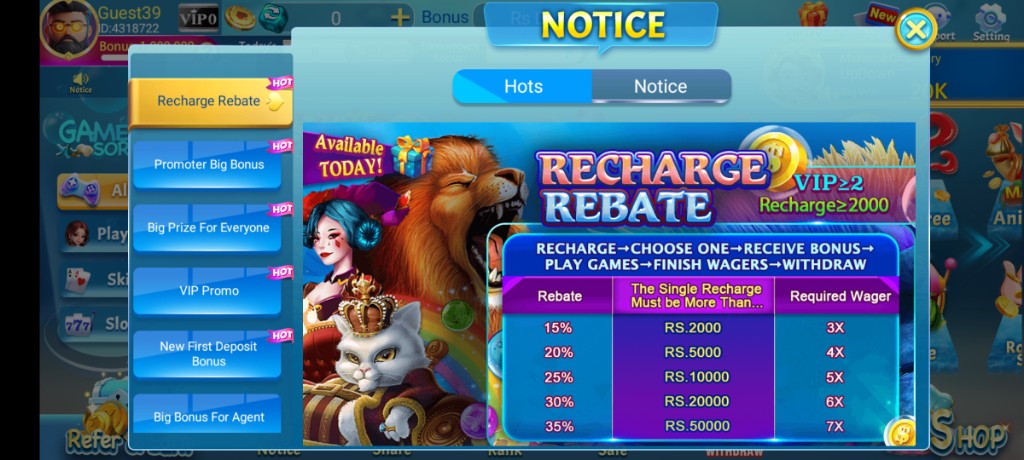
After an app update, menus can move. Find the bonus entry again before you assume the reward vanished. Check Notice for maintenance notes. Claim once after the lobby finishes loading fully. Update days are bad moments for impatient reinstalls because you may still be confirming that Logon works on the new build.
If a claim button appears in a new place, take a screenshot for your own notes so tomorrow’s routine is faster. Do not download a third-party “bonus finder.” The only finder you need is your eyes inside the official client.
| Update-day issue | First check | Second check |
|---|---|---|
| Cannot find button | Lobby + events panels | Notice / mail |
| Claim spins forever | Network + single restart | Balance/mail verify |
| Wrong account after update | Logon identity | Stop claiming until fixed |
Multi-Device Caution
Logging into the same account on two phones to claim faster usually creates sync confusion rather than advantage. Pick a primary device for claims. If you switch phones, Logon fully before touching bonus buttons. Racing claims across devices is a creative way to manufacture support tickets.
- Primary device for daily claim
- Full Logon after device switches
- No parallel claim races
- No second Guest “backup streak” accounts
Reward Framing
Frame the daily bonus as a coupon for entertainment, not as wages. Coupons can expire from missed days without ruining your week. Wages thinking creates desperation and bad table decisions after claims. If a claim makes you feel you must play immediately, impose a five-minute pause before any table join.
- Claim
- Pause
- Decide whether a timed session still fits today
- Either play short or exit cleanly
That pause is the difference between a reward routine and a compulsion loop. Keep the pause even when a friend is waiting in a room. Friends can wait two minutes; your future mood will thank you.
Screenshots
These are real app UI screenshots to make each step easier to follow. Balances and events can change, so always match what you see in your installed version.
Frequently Asked Questions
Where do I usually claim daily bonus?
Check the lobby bonus area and any mailbox or events panel shown in your version.
Why is the claim button disabled?
You may be early for reset, offline, or already claimed for the cycle.
Does bonus equal income?
No. Treat it as an engagement reward that supports entertainment play.
Can reinstalling force a new bonus?
That can risk progress if your account is not linked. Do not spam reinstalls.
Should I claim on mobile data?
Stable Wi‑Fi reduces claim sync issues.
What if claim animation freezes?
Restart the app once and check balance or mail instead of tapping repeatedly.
Conclusion
If rewards matter to you socially, read the referral page next.
Next step: 3 Patti Pearl Referral Program Explained.